Screen time is the conversation that never ends in most households. How much is too much? Which apps are actually the problem? Is it the gaming, the endless scrolling, or the messaging that goes quiet the moment a parent walks in? In 2026, screen-time and app-monitoring tools have become the practical way families answer those questions with facts instead of guesses.
But these tools aren’t all the same. Some are pure time-limiters. Some focus on which apps are being used and for how long. And the best ones also help with the deeper question hiding underneath screen time — what your child is actually doing inside those apps. Here are eight of the best, matched to different family needs.
What to Look for in a Screen Time and App Monitoring Tool
The strongest tools go beyond a simple timer:
- App-level insight: Which apps dominate the day, not just total hours?
- Activity, not just limits: What’s happening inside the apps that matter most?
- Easy controls: Can you adjust limits without a fight every evening?
- Reliable and transparent: Does it run smoothly, and does your child know it’s there?
A timer alone tells you how long. The best tools also help you understand what and who — which is where the real insight lives.
1. VigilKids
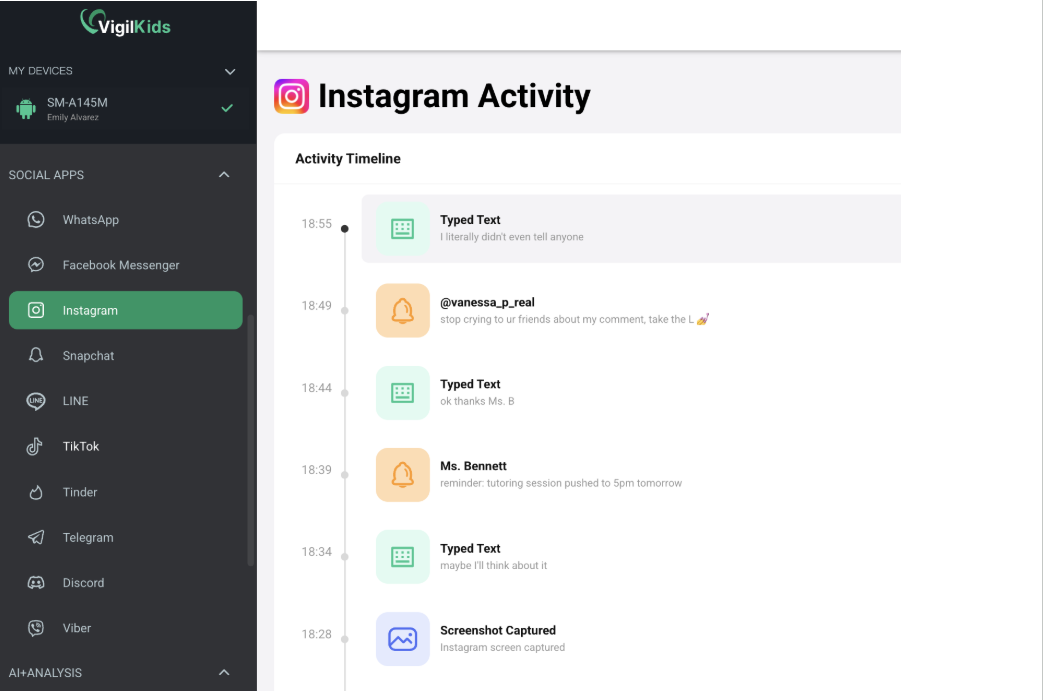
VigilKids tops this list because it treats screen time as a starting point, not the whole story. Yes, it shows you app and activity history — which apps are eating the afternoon, so screen-time conversations are grounded in facts rather than vibes. But its real strength is going one level deeper, into the messaging activity that screen-time totals can’t reveal.
That matters because “four hours on WhatsApp” isn’t really a screen-time problem — it’s a who are they talking to question. VigilKids answers it with WhatsApp, SMS, and call-log visibility, so you understand not just how long your child is on an app, but what’s actually happening inside it. Add location tracking and browser history, and you get a complete picture in one tool. It runs quietly in the background, installs in minutes, and is built for transparent, consent-based use where your child knows it’s there.
Pricing is straightforward: $39.99/month, $26.66/month quarterly, or $9.99/month annually ($119.98/year) — about 75% cheaper per month than monthly billing, all features included, with a 14-day money-back guarantee.
Best for: parents who want app insight and the messaging context behind it.
2. Apple Screen Time
Built into every iPhone and iPad, Apple Screen Time is the default starting point for families in the Apple ecosystem. It offers app limits, downtime scheduling, and content restrictions at no extra cost, all managed through Family Sharing. For parents who simply want to cap hours and restrict content on Apple devices, it’s a capable, free baseline.
The limits are real, though: it’s Apple-only, offers no messaging insight, and motivated teens can sometimes find workarounds. As a first line of defense, however, it’s hard to beat the price.
Best for: Apple families who want free, built-in time limits.
3. Google Family Link
Family Link is Google’s free equivalent, focused on Android and Chromebook. It handles app approvals, screen-time limits, and location, all managed from the parent’s phone. For younger kids on Android, it covers the essentials well and costs nothing.
Like Apple’s tool, it’s strongest on time management and weakest on what’s happening inside apps — there’s no real messaging visibility — but as a free foundation, it’s a smart place to begin.
Best for: Android families wanting free, basic app controls.
4. Qustodio
Qustodio is one of the most polished dedicated screen-time apps, with strong scheduling, app blocking, and web filtering across devices including desktop. Its dashboard makes it easy to see usage patterns and set rules, which is why it’s a long-standing favorite for managing younger kids’ time.
Where it stops short is depth: it shows usage and filters content well, but won’t tell you who your child is messaging. For families focused purely on time and content, though, it’s excellent.
Best for: detailed screen-time scheduling and web filtering.
5. OurPact
OurPact specializes in granular screen-time control, with the ability to block or grant app access on demand and schedule device-free time for meals, homework, and bed. Parents who want hands-on, moment-to-moment control over when devices are usable often prefer it.
Its focus is firmly on access management rather than activity insight, so it pairs well with a messaging-aware tool if that’s also a concern. But for pure scheduling power, OurPact is among the best.
Best for: parents who want precise, on-demand app blocking.
6. Bark
Bark approaches app monitoring through alerts rather than limits. It scans activity across many apps for signs of trouble — bullying, predatory contact, concerning language — and notifies parents only when something warrants attention. It’s less about capping hours and more about catching genuine risks inside the apps kids use.
For parents who care less about time totals and more about safety signals, Bark is a strong, privacy-conscious complement to a screen-time tool.
Best for: safety alerts across the apps kids actually use.
7. mmGuardian
mmGuardian blends screen-time controls with stronger text and call monitoring than most timer-focused apps. It lets parents set limits while also offering visibility into messaging, positioning it between pure screen-time tools and deeper monitoring apps.
The interface feels a little dated, but the combination — time management plus some messaging insight — suits families who want more than a timer without jumping to a full monitoring suite.
Best for: screen-time controls with added text and call visibility.
8. FamiSafe
FamiSafe (by Wondershare) is an all-in-one option covering screen time, app usage, location, and web filtering. It’s a balanced choice for parents who want a single tool that does a bit of everything without specializing too heavily in any one area.
Its breadth is the appeal and the limitation — it’s competent across the board but shallower than specialist tools in any given area, including messaging. For families wanting one approachable app for the basics, it fits well.
Best for: an approachable all-in-one for screen time and basics.
Which Tool Is Right for Your Family?
It depends on how deep you need to go.
If you want free time limits and you’re on Apple or Android, Apple Screen Time and Google Family Link are the obvious no-cost starting points. For detailed scheduling and web filtering, Qustodio and OurPact lead. If you want safety alerts inside apps, Bark is ideal. And if you want to understand not just how long your child is on an app but what’s happening inside it — especially in messaging — VigilKids is the strongest choice, with mmGuardian and FamiSafe as more balanced all-rounders.
Final Thoughts
Screen-time tools have come a long way from simple timers. The best ones in 2026 recognize a truth most parents already sense: the number of hours matters far less than what’s happening during them. A child quietly messaging for two hours raises very different questions than one playing a game for two hours. That’s why the most useful tools pair app-level time insight with visibility into the conversations underneath — delivered transparently, with your child’s knowledge. Match the depth to your family’s needs, and the right tool above will stand out.
FAQs
- What’s the best free screen-time tool? Apple Screen Time (for iPhone/iPad) and Google Family Link (for Android) are both free and cover basic limits and app controls.
- Which tool shows what’s happening inside apps, not just time spent? VigilKids goes beyond usage totals to show messaging activity — WhatsApp, SMS, and calls — giving context that timers can’t.
- Which tool is best for precise app blocking? OurPact specializes in on-demand blocking and scheduling device-free time.
- Which tool gives safety alerts rather than time limits? Bark scans app activity and alerts parents to genuine concerns instead of simply capping hours.
- Should screen-time monitoring be done with my child’s knowledge? Yes. Consent-based monitoring, where your child knows the tool is installed, is both more effective and better for trust than secret tracking.