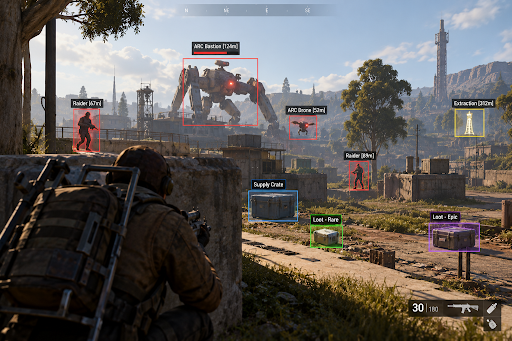
An ARC Raiders run involves more than spotting another player. Raiders have to consider other squads, ARC machines, available loot and the route to extraction. A quiet area can become dangerous quickly, and a detour for valuable items may expose the whole team. That is why it helps to understand what different visual features are meant to show before comparing products.
The ARC Raiders cheat guide to ESP, loot, aimbot and DMA explains the main feature groups in the context of a surface raid. It separates player information, ARC and drone visuals, loot details, aim settings and product types, giving readers a starting point for understanding what the terms mean.
Player ESP answers a threat question
Player ESP concerns information about other Raiders. Depending on the product, the listing may include options such as boxes, skeletons, names, health, armour, weapons, distance or visibility colors. These details can help explain whether another Raider is close, whether they appear exposed and whether the route ahead deserves more caution.
Different situations call for different ranges. In a building or tight area, nearby player information may matter more than markers far across the map. When crossing open ground, a longer view could be more relevant. The purpose of a distance setting is to help focus attention on the part of the raid that affects the next decision.
A wallhack is commonly discussed as a way to keep player positions visible through terrain or structures. That term can overlap with ESP, but it does not describe every visual option in a menu. Check the individual product page to see what player information is actually listed.
ARC and drone visuals are a separate layer
ARC threats and drones create different concerns from enemy Raiders. A product may identify ARC types, drones, weak points, traps, mines or destroyed enemies. Those details can help a team decide whether to engage, move around a threat or save ammunition for another encounter.
This information is especially useful to compare separately from player ESP. A menu that shows Raider positions does not automatically include ARC or drone markers. Product names and screenshots can also differ, so confirm these options on the current listing before assuming they are included.
Loot ESP affects route choices
Loot information can influence whether a team stays on its current route or takes a detour. Product descriptions may mention item names, values, rarity, containers, corpses, salvage, supply stations or extraction points. Filters by value, type or distance can help narrow down a long list of items to those relevant to the team’s current plan.
A high-value item may be worth a short detour, but stopping to check every container can add exposure and time. Loot information works best when it supports the objective for that particular run rather than encouraging the team to follow every marker.
Keep the display readable
Player, ARC and loot information can all appear in the same match. If every object is shown at maximum distance, the important details may be harder to notice. A more focused setup might prioritize nearby Raiders, add only the ARC information relevant to the route and filter items by rarity or value. The available settings vary by product, so check what the current menu actually offers.
The guide at ARC Raiders ESP, aimbot and DMA explained also discusses how the live products differ. Before choosing one, compare the published features, requirements, software type, price and current status. Game updates can affect third-party software, and no status label removes account or detection risk.