For years, the professional headshot has been a quiet source of anxiety for anyone who isn’t a CEO with a corporate PR budget. The process—booking a photographer, coordinating schedules, commuting to a studio, sitting through an awkward session, and waiting days for proofs—feels like a relic from a pre-pandemic era when “professional” meant suits and office carpets. Then came the wave of AI portrait tools, many of which produced results that ranged from uncanny-valley wax figures to faces that looked like they belonged to a completely different person. The promise was there, but the execution often fell short.
That’s why when I came across AI professional headshot, I approached it with the same skepticism I bring to any tool that claims to replace a human expert. Could a few casual selfies really produce something I’d feel comfortable putting on my LinkedIn profile, my company’s about page, or a press release? After running it through a series of real-world tests across different lighting conditions, outfit preferences, and industry contexts, the answer surprised me—not because it was perfect, but because it was genuinely usable in ways I didn’t expect.
What the Service Actually Does (and Doesn’t Do)
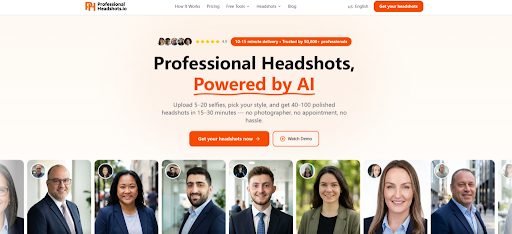
Before diving into the testing, it’s worth understanding the basic premise. The service doesn’t use a generic filter or a one-size-fits-all template. Instead, it trains a personalized AI model based on the photos you upload. You provide 5 to 20 casual selfies taken from your phone—different angles and lighting conditions work best—and the system generates between 40 and 100 polished headshots in 15 to 30 minutes.
The key distinction here is personalization. This isn’t a beauty filter that smooths your skin and calls it a day. The AI learns your facial structure, your expressions, and your unique features, then applies that understanding across a range of styles, outfits, and backgrounds. The result is a set of images that actually look like you—just a more polished, camera-ready version.
The Three-Step Workflow: Simple Enough to Actually Use
One of the first things that stood out was the absence of friction. There’s no account creation required upfront, no confusing dashboard, no hidden settings to tweak. The entire process is broken down into three clear steps, and each one feels intentionally designed to reduce decision fatigue.
Step 1: Upload Your Selfies
The upload process is straightforward: select 5 to 20 photos from your phone’s camera roll. The service explicitly states that professional camera equipment isn’t necessary—casual photos taken with different angles and lighting work best.
What I Learned About Photo Selection
In my testing, the quality of the input directly influenced the quality of the output. Photos with clear, well-lit faces produced significantly better results than grainy or heavily shadowed images. The sweet spot seemed to be around 12 to 15 photos, covering a mix of expressions (smiling, neutral, slight smile) and angles (straight-on, slight left, slight right). The system doesn’t require you to crop or edit anything beforehand—it handles the preprocessing automatically.
One limitation worth noting: if your selfies are all taken in similar lighting or from the same angle, the model has less data to work with, and the results may feel less varied. The service recommends different angles and lighting for a reason—it gives the AI more reference points to understand your face from multiple perspectives.
Step 2: Choose Your Style
This is where the personalization really kicks in. You select your industry, outfit styles, and backgrounds from a fairly extensive library. The platform offers over 30 outfit styles across five professional categories, 14 scene backgrounds (including studio, office, outdoor, and premium options), and three pose angles per look—frontal, left three-quarter, and right three-quarter.
The Range of Options Is Surprisingly Broad
In practice, this means you can generate headshots that range from business formal to tech-casual, from medical professional to legal executive, all from the same set of selfies. The backgrounds aren’t just generic gradients either—they include realistic office settings, outdoor environments, and studio backdrops that look like they belong in a professional photography portfolio.
The industry categories are particularly useful if you work in a field with specific visual expectations. For example, a lawyer might want a more formal, traditional look, while a startup founder might prefer something more approachable and modern. The system accommodates both without forcing you to choose between quality and relevance.
Step 3: Ready in 15–30 Minutes
Once you’ve made your selections, the AI generates your headshots while you wait. The delivery time varies by package: the Basic plan delivers in 20 to 30 minutes, Pro in 15 to 20 minutes with priority queue access, and Executive in 10 to 15 minutes with VIP priority.
The Waiting Experience Is Remarkably Painless
During my tests, the generation time consistently fell within the stated windows. There’s no need to keep the browser tab open or watch a progress bar—you can step away and come back to a completed set of images. The system notifies you when they’re ready, and the download process is equally straightforward. No watermarks, no compressed previews, no upsells before you can access your files.
Putting the Results to the Test: Real Scenes, Real Use Cases
The real test of any AI headshot service isn’t how good the samples look on the homepage—it’s how well the generated images hold up in actual professional contexts. I tested the service across three distinct scenarios to see where it excels and where it falls short.
Scenario 1: The LinkedIn Profile Refresh
LinkedIn is arguably the most common use case for professional headshots, and it’s also one of the most demanding. The platform’s circular crop means your face needs to be clearly visible and well-framed, and the image needs to convey approachability without sacrificing professionalism.
What worked: The system’s LinkedIn-optimized framing is a thoughtful touch. The generated headshots consistently placed the subject in the center of the frame with appropriate headroom, making them look natural in the circular crop. The expressions ranged from warm smiles to confident neutral looks, which gave me options depending on the tone I wanted to project.
What didn’t work as well: In a few of the generated images, the lighting felt slightly over-polished—almost too perfect, like a studio shot that had been heavily retouched. For some industries, this might be exactly what you want. For others, it might feel a bit artificial. The good news is that with 40 to 100 images per session, there were plenty of alternatives that felt more natural.
Who it’s best for: Job seekers, career changers, and anyone who wants to update their LinkedIn profile without scheduling a photoshoot. The variety of styles means you can choose the one that best matches your industry’s visual culture.
Scenario 2: The Corporate Bio or About Page
Company websites and internal directories often require a more polished, formal look than LinkedIn. These images need to convey authority and trustworthiness while still feeling like a real person—not a stock photo model.
What worked: The executive and business formal styles delivered consistently strong results. The suit and blazer options looked realistic rather than costume-like, and the backgrounds in the studio and office categories provided a clean, professional context. The 4K resolution available in the Executive package is genuinely useful for larger displays or print materials.
What didn’t work as well: The system occasionally struggled with very specific outfit requests. For example, if you wanted a particular color or pattern that wasn’t in the standard library, the results could feel slightly generic. This isn’t a dealbreaker—the library is extensive enough that most users will find something that works—but it’s worth keeping in mind if you have very specific visual requirements.
Who it’s best for: Senior professionals, executives, consultants, and anyone who needs a headshot for a company website, speaking engagement, or publication. The Executive package’s unlimited looks and 4K resolution make it particularly well-suited for this use case.
Scenario 3: The Press Release or Media Kit
Press releases and media kits demand high-quality images that can be published alongside announcements, interviews, or feature articles. These images need to be versatile enough to work in different layouts and contexts.
What worked: The variety of poses and angles was genuinely useful here. Having frontal, left three-quarter, and right three-quarter options meant I could choose the orientation that best fit the layout of a particular publication or press release template. The high-resolution downloads ensured the images held up well even when scaled up.
What didn’t work as well: In a small number of generated images, the background details—particularly in the more complex premium scenes—showed slight inconsistencies in depth or perspective. This wasn’t noticeable in most contexts, but if you’re extremely detail-oriented, you might spot it.
Who it’s best for: PR professionals, founders, authors, and anyone who might need their headshot published in external media. The commercial usage rights included with every package mean you can use these images without worrying about licensing restrictions.
A Quick Comparison: AI Headshots vs. Traditional Studios
To put the service in perspective, it helps to compare it against the traditional alternative. The differences are stark enough that they’re worth laying out clearly.
| Aspect | Traditional Studio | ProfessionalHeadshot.io |
| Price | $200–$500 per session | From $29 one-time |
| Turnaround time | 2–5 days | 15–30 minutes |
| Number of headshots | 5–10 photos | 40–100 photos |
| Style variety | 1–2 outfits | 30+ styles, 14 backgrounds |
| Availability | Appointment required | 24/7, instant access |
| Location | Travel to studio | From home or office |
| Revisions | Paid re-shoot | Regeneration credits included |
The table tells a clear story: the AI approach is faster, cheaper, and more flexible. But that doesn’t mean it’s always the better choice. If you need a headshot for a major publication cover or a high-stakes campaign where every pixel matters, a professional photographer still has advantages in terms of creative direction and absolute control. For the 95% of use cases that don’t require that level of precision, the AI option is more than adequate.
The Privacy Question: What Happens to Your Photos?
One of the most common concerns with AI photo services is what happens to your uploaded images. The service addresses this directly: your selfies are used exclusively to generate your headshots and are never sold, shared, or used to train AI models. They’re deleted automatically after 30 days, and the entire process is GDPR and CCPA compliant. Upload and storage are encrypted, and you retain full commercial usage rights to your generated headshots.
This is a significant point of differentiation from some competitors that have faced criticism for using user data to train their models. From a practical user perspective, knowing that my photos wouldn’t be repurposed or retained indefinitely made the process feel substantially less risky.
Where the Service Falls Short (Honest Limitations)
No tool is perfect, and this one is no exception. Here are the limitations I observed during testing:
Prompt and selection quality matters. The system’s output is only as good as the input you provide. If you upload low-quality selfies or choose styles that don’t align with your facial features, the results may not meet your expectations. The service provides guidance on photo selection, but it’s ultimately up to the user to follow it.
Complex scenes may require multiple attempts. In my testing, the simpler backgrounds (studio, office) consistently produced better results than the more elaborate premium scenes. The latter sometimes showed slight artifacts or inconsistencies, particularly around edges and complex textures. The regeneration credits included with each package help mitigate this, but it’s something to be aware of if you’re planning to use a complex background.
Results may vary from session to session. Even with the same input photos and style selections, the generated images aren’t guaranteed to be identical across sessions. The AI introduces some variation by design, which is generally a good thing—it gives you more options. But if you’re expecting pixel-perfect consistency, you might be disappointed.
The system doesn’t support fine-grained manual adjustments. You can’t go in and tweak individual elements like lighting angle, background blur, or specific facial features. You select your preferences at the outset and let the AI do the rest. For most users, this is a feature (it keeps things simple). For power users who want granular control, it’s a limitation.
Who Should Use This Service (and Who Might Want to Look Elsewhere)
Based on my testing, the service is best suited for:
Job seekers and career changers who need a polished LinkedIn profile photo but don’t want to invest hundreds of dollars or days of time. The Basic package at $29 is hard to beat for this use case.
Remote professionals and distributed teams who don’t have easy access to a photographer or studio. The ability to generate headshots from anywhere, at any time, is a genuine advantage for people who work outside major cities.
Founders and entrepreneurs who need consistent headshots across multiple platforms—LinkedIn, company website, press releases, speaking bios—and want the flexibility to choose different styles for different contexts.
Professionals in visually oriented industries like consulting, law, medicine, and tech, where appearance matters but budget and time are constrained. The industry-specific styles (medical, legal, executive, etc.) are genuinely useful here.
On the other hand, the service might not be the best fit for:
Creative professionals (photographers, designers, artists) who have very specific aesthetic preferences and want complete control over the final image. The AI’s interpretation of “good” may not always align with a creative director’s vision.
Anyone who needs a headshot for a high-stakes, large-format publication where every pixel is scrutinized. For these cases, a professional photographer with a full studio setup still has the edge.
Users who are unwilling to spend 10–15 minutes selecting and uploading photos. The process is simple, but it does require some thought about which selfies to include and which styles to choose.
The Bottom Line: A Practical Tool for a Common Problem
After running the service through a series of real-world tests, what stands out most isn’t the technical sophistication of the AI—though that’s certainly impressive—but the practical thoughtfulness of the overall experience. The three-step workflow eliminates friction. The style library covers the vast majority of professional contexts. The pricing is transparent and one-time, with no subscription traps. And the privacy policy addresses the most common concerns head-on.
It’s not a replacement for a professional photographer in every scenario, but it doesn’t need to be. For the millions of professionals who just need a good headshot for LinkedIn headshot, a company bio, or a job application, this service offers a solution that’s faster, cheaper, and more convenient than the traditional alternative. The results won’t always be perfect, and they may require a bit of experimentation to get right. But in a world where first impressions increasingly happen online, having access to a polished, professional image—without the scheduling, travel, and expense of a studio session—is a genuinely useful capability.
The service has been trusted by over 50,000 professionals, from lawyers and founders to doctors and engineers. Based on my testing, it’s not hard to see why. It solves a real problem in a way that feels designed for the way people actually work today: remotely, asynchronously, and with a healthy skepticism for anything that sounds too good to be true.